What is an MCP server, and when is it worth building one?
MCP gives AI apps one standard way to reach tools and data. What a server exposes, what the July 2026 spec changed, and when a plain API call is still simpler.

Before MCP, connecting an AI app to a tool meant writing glue for that app and that tool. A GitHub integration for one chat client was useless to the next client, and every IDE assistant reinvented its own way to read files. The Model Context Protocol replaces that with one agreement: if a tool speaks MCP, any application that speaks MCP can use it.
That is the whole idea, and it explains most of the adoption. Anthropic introduced MCP in November 2024. OpenAI adopted it in March 2025 and Google DeepMind the following month. In December 2025 Anthropic transferred the protocol to the Agentic AI Foundation, a directed fund under the Linux Foundation that Anthropic co-founded with Block and OpenAI. It is no longer one vendor’s format.
This article explains what an MCP server actually is, what changed in the July 2026 version of the specification, and how to decide whether building one is worth it.
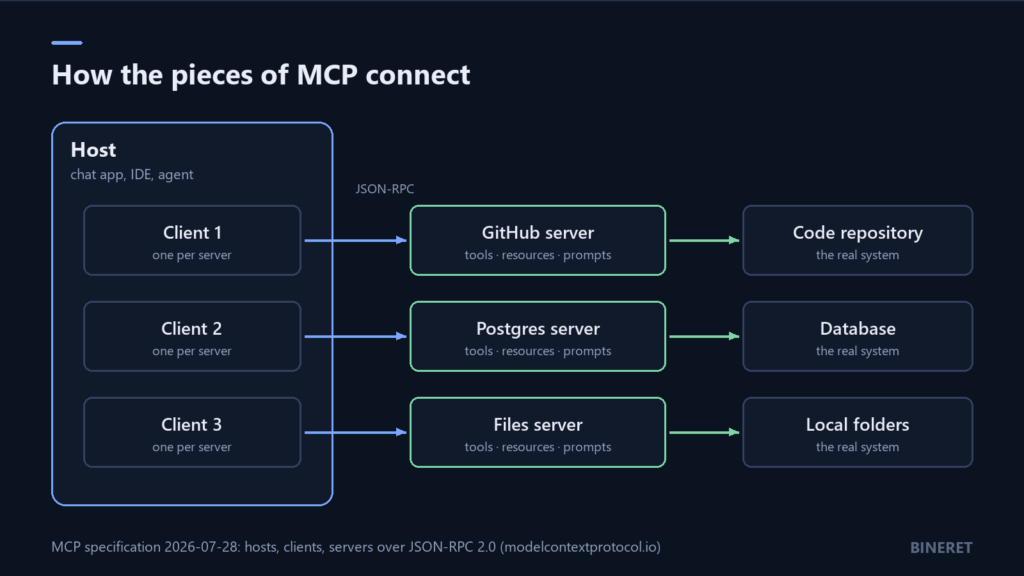
The three roles: host, client, server
The specification uses three terms, and they are easy to blur, so here they are exactly as it defines them:
- Host: the LLM application that starts connections. A desktop chat app, an IDE, an agent framework.
- Client: a connector inside the host. The host creates one for each server it talks to.
- Server: a service that provides context and capabilities. This is the part you build if you want AI apps to reach your system.
Messages between them are JSON-RPC 2.0. The specification says it took inspiration from the Language Server Protocol, which did the same job for programming languages: write support for a language once, and every editor that speaks LSP gets it.
What a server offers
An MCP server can expose three kinds of thing. The difference between them is who decides when they are used.
- Tools are functions the model can call: create an issue, run a query, send a message. The model decides when to use them, which is why the specification treats tools as arbitrary code execution and says hosts must get the user’s consent before invoking one.
- Resources are data for the user or the model to read, such as a file, a record or a document.
- Prompts are templated messages and workflows that a user picks, like a saved “review this pull request” instruction.
Communication runs both ways. In the current specification, a client can offer elicitation: the server asks the user for extra information in the middle of an operation, for example to confirm which of two accounts it should use.
A minimal server in Python
The official Python SDK builds the protocol details for you from type hints and docstrings. This is the quickstart from its README, for version 2 of the SDK:
uv add "mcp[cli]"from mcp.server import MCPServer
mcp = MCPServer("Demo")
@mcp.tool()
def add(a: int, b: int) -> int:
"""Add two numbers."""
return a + b
@mcp.resource("greeting://{name}")
def greeting(name: str) -> str:
"""Greet someone by name."""
return f"Hello, {name}!"The docstring is not decoration. It becomes the description the model reads when deciding whether to call the tool, so write it for a reader who has never seen your system. For local development the SDK runs the server with uv run mcp dev server.py. To serve it over HTTP, it uses the Streamable HTTP transport:
uv run mcp run server.py --transport streamable-httpA local server that talks to one desktop app over standard input and output is the simplest case. A remote server over HTTP is what you build when several people or apps share it, and that is where the recent specification changes matter.
What the 2026-07-28 specification changed
The July 2026 revision is the most significant since launch, and most of it is about running servers at scale. The headline change is a stateless core.
- No more sessions. The
initializehandshake and theMcp-Session-Idheader are gone. Every request describes itself. The MCP team’s summary is that any request can now land on any server instance behind a plain round-robin load balancer, without shared storage. - State becomes explicit. If a tool needs to remember something between calls, the recommended pattern is to mint a handle from one tool and have the model pass it back as an argument to the next.
- Asking for input without holding a connection. Multi Round-Trip Requests let a server reply that it needs user input, with a result type of
input_required, instead of keeping a stream open while it waits. - Routing headers. Requests carry
Mcp-MethodandMcp-Nameheaders, so a gateway or firewall can make decisions without parsing the JSON body. - Cacheable lists. Tool, prompt and resource listings now include
ttlMsandcacheScope, so clients do not need to ask for the tool list on every request. - Tighter authorization. Authorization servers must return an issuer parameter that clients validate (RFC 9207), and client credentials are bound to the server that issued them.
Some things are on their way out. Roots, sampling and logging are deprecated, with at least 12 months before removal, and new implementations should not adopt them. The legacy HTTP+SSE transport has a year-long off-ramp. Dynamic Client Registration is deprecated in favour of Client ID Metadata Documents. Long-running work moved from the core into a Tasks extension.
If you maintain a server built on an older revision, the practical to-do list is short: stop depending on session state, move off HTTP+SSE if you still use it, and check your authorization flow against the new issuer rules.
Security: the part people skip
An MCP server gives a model the ability to act, and models follow instructions they find in the content they read. The specification is direct about this. It says tool descriptions and annotations should be treated as untrusted unless they come from a trusted server, and that users should understand what each tool does before authorizing it.
Researchers raised concrete attacks within months of launch, including prompt injection through content a tool returns, and “poisoned” tools whose descriptions quietly instruct the model to leak data through other connected tools. You can see the ecosystem hardening in ordinary release notes: Flowise’s final release, 3.1.4, added an operator-controlled allowlist for which commands a custom MCP stdio server may run.
If your server can read private data and the model can also see untrusted content and some tool can send data out, you have built the setup that prompt injection attacks look for. Prompt injection, and the defences that actually hold explains why that combination matters and what to do about it.
When building an MCP server is worth it
MCP is a way of publishing a capability to many AI clients. That makes the decision fairly clear.
Build one when:
- You want your product or internal system usable from several AI apps, including ones you do not control, such as desktop assistants, IDEs and agent frameworks.
- Your users already work in MCP-capable tools. LibreChat, AnythingLLM and RAGFlow’s agents can all use MCP servers, and so can most coding assistants.
- You are exposing a set of related actions that a model should choose between, not a single fixed call.
Skip it when:
- Only your own application calls the tool. A normal function call in your code, passed to the model through its tool-use API, is simpler and has fewer moving parts.
- The steps always happen in the same order. That is a workflow, not a tool a model needs to choose. See AI agents vs workflows.
- You cannot yet say who is allowed to call each tool. Authorization is the hard part of a remote server, not the protocol.
You may not need to write code at all
For many internal use cases the server can come from a tool you already run. Langflow can serve any flow you build as an MCP server, so a retrieval pipeline or a multi-step workflow becomes a tool that MCP clients call. On the client side, LibreChat lets a team use MCP servers inside shared agents, and AnythingLLM supports them on a single desktop.
If you are designing a remote MCP server for a product, with real authorization and many clients, that is squarely the kind of work our AI and automation engineering service takes on.
Comments
No comments yet — be the first to share what you think.