Prompt injection: why filters fail and which defences actually hold
Prompt injection tops OWASP's list of LLM risks because models cannot tell instructions from data. Detection helps a little; architecture is what holds.

Here is the entire problem in one sentence: a language model receives instructions and data through the same channel, as text, and it has no reliable way to tell them apart.
Everything else about prompt injection follows from that. A support bot reads a customer message that says to ignore its rules. An email assistant summarises a message containing a hidden line telling it to forward the inbox somewhere. A coding agent opens a README with instructions buried in a comment. In each case the model sees words, and words that look like instructions tend to get followed.
OWASP puts prompt injection first, as LLM01, in its 2025 Top 10 for LLM Applications. This article covers how the attacks work, why the obvious defence of filtering for bad inputs keeps failing, and the design choices that genuinely limit the damage.
Direct and indirect injection
OWASP separates two kinds, and the difference decides who your attacker is.
Direct injection is when a user’s own input changes the model’s behaviour in ways you did not intend. The classic example is typing “ignore all previous instructions” into a chatbot. OWASP notes this can also happen by accident, when an innocent input happens to derail the model. The attacker is your user, and the damage is usually limited to what that user could already see or do.
Indirect injection is when the model processes outside content that contains instructions: a web page, a document, an email, a tool result. The attacker is whoever wrote that content, and they do not need access to your app at all. This is the dangerous kind, because it turns any content your system reads into a possible command.
OWASP’s example scenarios show how varied the delivery can be. Instructions can be split across several pieces of content so no single piece looks suspicious. They can be hidden inside images for multimodal models, written in another language, encoded, or appended as a string of characters that looks like noise to a person and works on the model.
Why filters are not a fix
The natural first response is to detect injection: scan inputs for suspicious phrasing, or ask a second model whether a message looks like an attack. These checks are worth having. They are not a security boundary, for a simple reason.
Attack text is ordinary language, and the space of ways to phrase an instruction is effectively unlimited. A filter trained on known attacks catches known attacks. Simon Willison, who coined the term “prompt injection” in 2022 and has written about it steadily since, put the standard bluntly in June 2025: a tool that catches 95% of attacks is a failing grade in security, because an attacker only needs the other 5%. In the same piece: “we still don’t know how to 100% reliably prevent this from happening.”
That changes the goal. If you cannot reliably stop the model from being fooled, design the system so that a fooled model cannot do much harm.
The lethal trifecta
Willison’s framing is the most useful starting point for that design work. An AI system is exposed to data theft through prompt injection when it combines three things:
- Access to private data. It can read your email, files, database or internal documents.
- Exposure to untrusted content. Something an outsider could have written reaches the model.
- The ability to communicate externally. It can send an email, call an API, or even render a link or image whose URL carries data out.
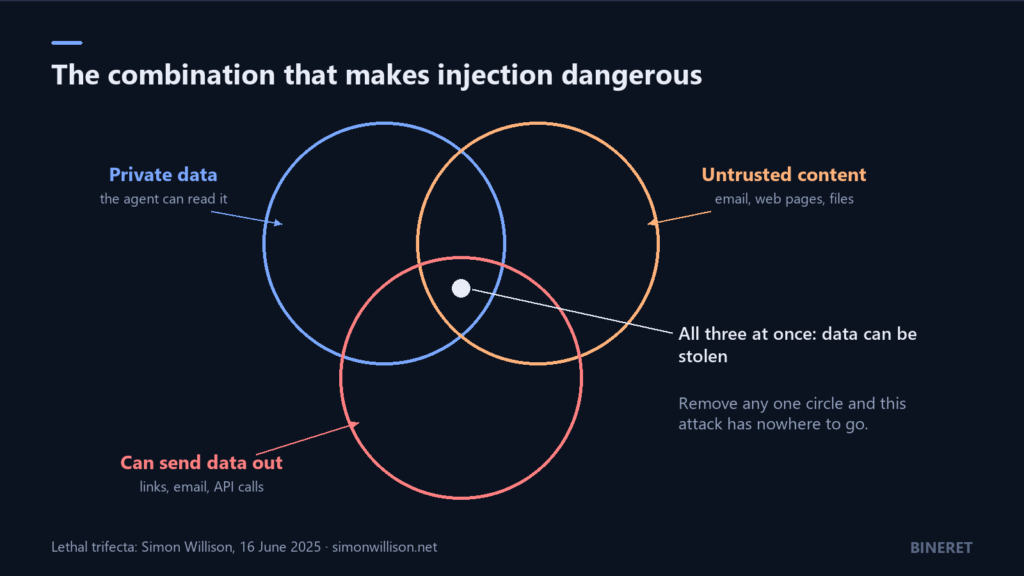
With all three present, an attacker’s text can tell the model to find the private data and send it out. Remove any one and that attack path closes. His conclusion is that the only safe approach is to avoid the combination entirely, and that when people connect tools together themselves, no vendor can guarantee it for them.
This is a design review you can do on a whiteboard in ten minutes. List every tool and data source an agent has, and mark which of the three circles each one puts you in. Tool ecosystems make this easy to get wrong. With MCP, a user can connect a mail server, a file server and a web-browsing server to the same assistant, and the three circles overlap without anyone deciding they should. The MCP specification itself says tool descriptions should be treated as untrusted unless they come from a trusted server, and that users must consent before any tool runs. What an MCP server is covers the protocol side.
Design patterns that hold
In June 2025 fourteen researchers from several organisations published Design Patterns for Securing LLM Agents against Prompt Injections. Its central principle is that once an agent has ingested untrusted input, it “must be constrained so that it is impossible for that input to trigger any consequential actions.” The paper proposes six patterns. Each trades some flexibility for that guarantee.
- Action-selector. The model picks from a fixed set of actions, and nothing those actions return is fed back into the model. It works like a smart menu, and there is no loop for injected text to steer.
- Plan-then-execute. The model commits to a plan of tool calls before it sees any untrusted content. Tool results can inform the output, but cannot change which actions run.
- LLM map-reduce. Each untrusted item is processed by a separate, isolated model call, and only constrained results, such as a yes/no or a score, are combined. One poisoned document cannot influence how the others are handled.
- Dual LLM. A privileged model plans and calls tools but never sees untrusted text. A quarantined model reads the untrusted text but has no tools. The privileged side refers to the quarantined output through variables, without reading it.
- Code-then-execute. The privileged model writes a program in a restricted language, and the system can trace exactly where untrusted data flows through it.
- Context minimisation. Remove content that is no longer needed, such as the user’s original request after it has been turned into a query, so injected text has less to work with in later steps.
A related system, CaMeL, described in the March 2025 paper Defeating Prompt Injections by Design, applies the code-and-capabilities idea in full. It separates control flow from untrusted data and enforces security policies when tools run. The authors report that it completed 77% of tasks in the AgentDojo benchmark with provable security, against 84% for an undefended system. That gap is a fair picture of the whole field: real protection costs some capability, and the cost is smaller than people fear.
A small example of the principle
You do not need a research system to apply the idea. Take an assistant that reads incoming support emails and decides how to route them. The unsafe version gives the model a “send email” tool and lets it act. A safer version never lets untrusted text choose an action freely: the model only classifies, and ordinary code decides what happens.
ALLOWED_QUEUES = {"billing", "technical", "account", "other"}

def route_email(body: str, classify) -> str:
    # The model reads untrusted text, but may only return a label.
    label = classify(
        "Classify this support email. Reply with exactly one word: "
        "billing, technical, account or other.\n\n" + body
    ).strip().lower()

    # Deterministic code validates the output. Anything unexpected,
    # including text an attacker injected, falls through to a safe default.
    if label not in ALLOWED_QUEUES:
        label = "other"
    return label
An attacker can still make the classifier pick the wrong queue. They cannot make it send an email, read another customer’s data, or call an API, because the model has no path to any of those. This is the action-selector pattern, and OWASP’s own list of mitigations points the same way: define output formats and validate them with deterministic code.
The practical checklist
OWASP lists seven mitigations for LLM01. In rough order of how much they protect you:
- Enforce least privilege. Give each model call the minimum tools and data access for its job. An assistant that summarises documents does not need to send email.
- Require human approval for high-risk actions. Payments, deletions, outbound messages and permission changes should wait for a person. Tooling is catching up here: LibreChat’s latest release candidate lets agent runs pause for a person to approve a tool call.
- Define and validate output formats with code, as in the example above.
- Segregate external content. Mark clearly, in the prompt structure, which text is untrusted. This helps the model and it helps reviewers. On its own it is not a guarantee.
- Constrain behaviour in the system prompt. State the model’s role and limits. Useful, and easy to override, so never the only control.
- Filter inputs and outputs. Catches the lazy attacks and gives you signals to monitor.
- Test adversarially and regularly. Try direct and indirect attacks against your own system, including through every tool result and document path.
Two nearby OWASP entries are worth reading alongside this one. LLM06, Excessive Agency, is about giving models more permissions or autonomy than they need, which is what turns a successful injection into an incident. LLM05, Improper Output Handling, covers what happens when model output is passed unchecked into a browser, a shell or a database query.
Where this leaves agents
The more autonomy a system has, the harder these guarantees are to keep, which is one more reason to prefer a workflow when the task allows it. AI agents vs workflows gives a test for deciding. When an agent is the right design, draw the three circles first, keep them from overlapping, and put a person in front of anything that cannot be undone.
If you are building an agent that touches customer data and want a security review of its tool design before launch, our AI and automation engineering team can help.

Comments
No comments yet — be the first to share what you think.