AI agents vs workflows: most tasks do not need an agent
An agent lets the model decide what happens next. A workflow keeps that decision in your code. How to tell which one your task needs.

“Agent” has become the word for almost anything built on a language model. A script that calls a model twice gets called an agent. So does a chatbot with one tool. The loose usage makes a real design decision hard to see, and that decision affects cost, reliability and how hard the thing is to debug.
The clearest line comes from Anthropic’s December 2024 guide, Building effective agents. It calls both kinds “agentic systems” and then separates them:
- Workflows are “systems where LLMs and tools are orchestrated through predefined code paths.”
- Agents are “systems where LLMs dynamically direct their own processes and tool usage, maintaining control over how they accomplish tasks.”
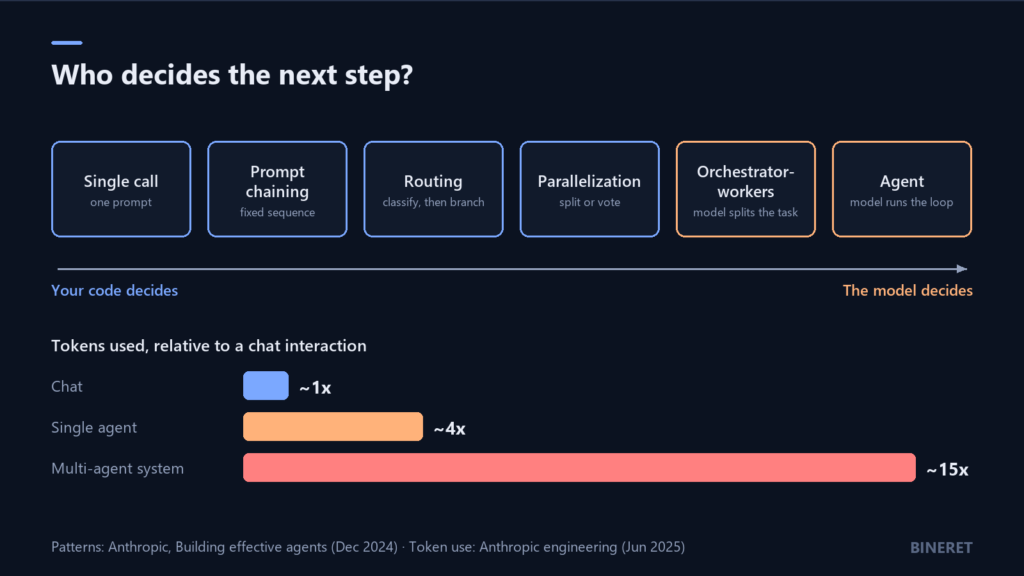
Put more plainly: in a workflow, your code decides what happens next. In an agent, the model does. Every AI agents vs workflows decision comes back to that question.
The five workflow patterns
Between a single model call and a full agent there is a lot of room, and most production systems live there. The same guide names five patterns worth knowing by name, because once you can name them you notice how many “agent” projects are really one of these.
Prompt chaining
The task is broken into steps that run in order, each working on the previous step’s output, with checks in code between them. Draft an outline, check that it covers the required points, then write the document from it. Use it when the steps are known in advance.
Routing
A first call classifies the input, and code sends it down a specialised path. Refund requests go to one prompt, technical questions to another, easy questions to a cheaper model. Use it when inputs fall into distinct kinds that deserve different handling.
Parallelization
Independent subtasks run at the same time, or the same task runs several times so the results can be compared or voted on. Checking a contract against ten separate policies is a natural fit. So is running a content check three times and flagging disagreements.
Orchestrator-workers
A central model looks at the task, decides how to split it, and hands pieces to worker calls, then combines the results. This is the first pattern where the model shapes the plan, which makes it the right choice when you cannot know the subtasks in advance, such as deciding which files a code change needs to touch.
Evaluator-optimizer
One call produces a result and another critiques it, in a loop, until the critique passes or a limit is hit. It works when there are clear criteria for “good enough” and iteration measurably improves the result, as with translation that has to keep specific terminology.
What an agent adds, and what it costs
An agent drops the predefined path. The model gets a goal and a set of tools, and it loops: decide, act, look at the result, decide again, until it thinks it is done. That is the right design when the number and order of steps genuinely cannot be known up front, like investigating a bug report or researching an open question.
The price is paid in three currencies.
Tokens. Every loop resends the growing context. Anthropic’s engineering team, writing about its multi-agent research system in June 2025, reported that agents typically use about 4 times more tokens than chat interactions, and multi-agent systems about 15 times more. In the same piece they found token usage by itself explained 80% of the variance in performance on their research evaluation. More tokens helped. They were not free.
Predictability. A workflow does the same steps every run. An agent may take six steps today and fourteen tomorrow on a near-identical input. That makes latency and cost hard to promise, and it makes a failure harder to reproduce.
Debuggability. When a workflow fails, you know which step. When an agent fails, you read a transcript of its reasoning to find out where it went wrong, and the answer is sometimes “it called the right tool with a slightly wrong query at step three.”
The guide’s advice on this is plain: agentic systems “often trade latency and cost for better task performance,” and you should take on that trade only when it is needed. For many applications, it notes, a single well-built model call with retrieval is enough.
A test for choosing
Ask these in order and stop at the first “yes.”
- Can one model call, with good context, do it? Then build that. Add retrieval if the problem is missing information.
- Can you write down the steps before seeing the input? Use prompt chaining, with code checks between steps.
- Do inputs fall into a few distinct kinds? Route them.
- Is the work made of independent pieces? Parallelize.
- Do the pieces depend on the input, but the task is still bounded? Orchestrator-workers.
- Is the path genuinely open-ended, and is a wrong step cheap to recover from? Now an agent makes sense.
The last question has two parts on purpose. An agent that researches and drafts a report can take a wrong turn and correct itself. An agent that can issue refunds or delete records cannot undo a wrong turn, so it needs tight limits, human approval on consequential actions, or a workflow instead.
When several agents make sense
Multi-agent systems are the most expensive option, and Anthropic’s write-up is specific about where they earn it: tasks with heavy parallelization, information that exceeds a single context window, and work with many complex tools. Broad research questions fit well.
They fit poorly, by the same account, when every agent needs to share the same context or when the subtasks depend heavily on each other. Coding is the example the post gives. If your task looks like that, one agent with good tools is usually better than a team of them passing notes.
Building either one well
The guide closes with three principles that apply to both designs:
- Keep it simple. Add a step, a tool or an agent only when a measurement says the simpler version fails.
- Make the planning visible. Log each decision and tool call so a person can follow what happened.
- Design the tools as carefully as the prompt. Tool names, descriptions and parameters are what the model reads to decide what to do. Test them the way you would test an API used by a new colleague.
It also recommends starting with LLM APIs directly rather than a framework, since many of these patterns take a few lines of code, and frameworks can hide the prompts and responses you need to see when something goes wrong.
Measure agents differently from single calls. Beyond answer quality, you care whether it called the right tools and reached the goal. Evaluation libraries now ship metrics for exactly that, which we touch on in how to evaluate a RAG system. And if your agent talks to outside systems through MCP, what an MCP server is covers the security questions to settle first.
A note on visual builders
Visual builders are a natural home for workflows: you can see the steps. They struggle as tasks get more open-ended. FlowiseAI gave roughly that reason when it shut Flowise down in 2026, saying developers increasingly rely on coding agents and that a rigid low-code workflow approach “quickly hits the limit” as complexity grows. Not everyone agreed with that explanation, and what to do if you run Flowise covers the options.
For the workflow end of the spectrum, Langflow lets you build visually and drop into Python when a component needs custom logic. For open-ended coding tasks, OpenHands runs coding agents on your own machines. And if you want to design agent groups without writing orchestration code, LobeHub Desktop organises work around them.
Whichever you pick, the order holds: start on the left of the spectrum, and move right only when a test shows you need to.
Comments
No comments yet — be the first to share what you think.