Self-hosted ChatGPT alternatives: picking one by who will use it
LibreChat, Open WebUI, AnythingLLM, LobeHub and Onyx all run private AI chat. The right one depends on your users, the licence and the upkeep.

The reasons for wanting a self-hosted ChatGPT alternative are usually practical. Legal would rather conversations did not sit on a vendor’s servers. The team wants to use Claude for writing and a local model for anything sensitive, in one window. Per-seat subscriptions add up faster than API calls do. Or someone simply wants to own the thing.
There are now several good open-source options, and comparisons of them tend to list features until everything looks the same. They are not the same. The quickest way to narrow the field is to ignore features at first and answer two questions: who will use it, and what will it need to know.
Versions and licence terms below were checked in September 2026. Both change, and licences in this space have changed more than once, so confirm before you commit.
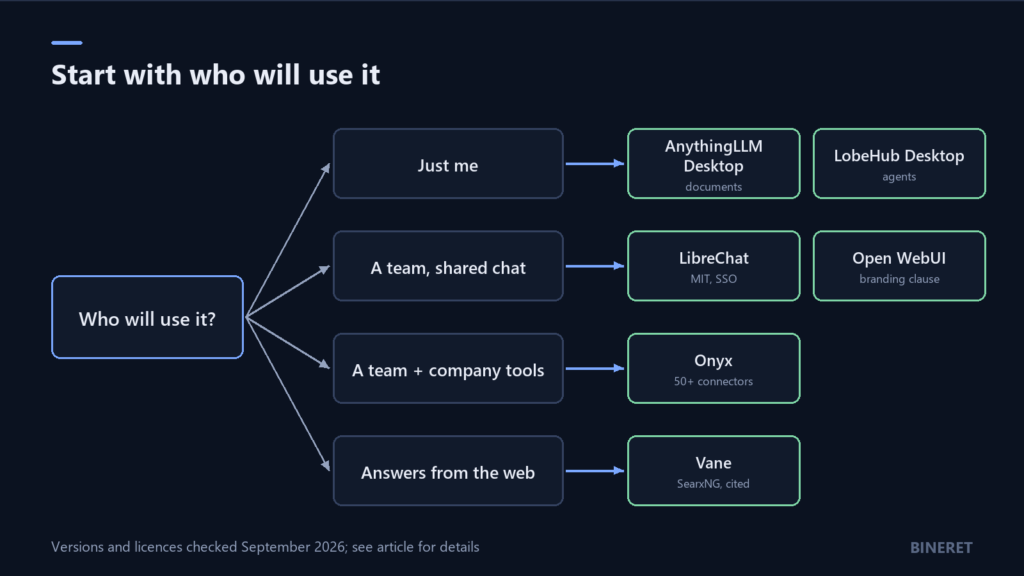
For one person on one computer
If the users are you, or each person installs their own copy, skip anything that needs a database server. A desktop app is less to look after and nothing to secure on a network.
AnythingLLM Desktop
AnythingLLM is the choice when chatting with documents is the point. It bundles a vector database (LanceDB), can run models locally or connect to more than a dozen hosted providers, and shows citations back to the source. It is MIT licensed.
Two things to know. The desktop build is single-user; multi-user accounts and the embeddable website widget are features of its Docker version. And it sends anonymous usage telemetry by default, which you can turn off under Privacy. We cover a fully local setup, including that switch, in offline RAG with Ollama and AnythingLLM.
LobeHub Desktop
LobeHub is organised around agents rather than documents: you build agents, give them models and tools, put several in a group, and schedule runs. If your use of AI looks more like delegating tasks than asking questions, it fits better than a plain chat client.
Read the licence before building on it. LobeHub uses its own Community License, which is Apache 2.0 with added conditions. Using it, including commercially, is allowed. Distributing a modified version needs a commercial licence from LobeHub.
For a team that wants a shared chat app
Once several people sign in to the same instance, you need accounts, permissions, and a server someone is responsible for. The two most common choices are LibreChat and Open WebUI.
LibreChat
LibreChat looks and works much like ChatGPT, and it is the most complete multi-user option here. It connects to Anthropic, OpenAI, Azure, Bedrock, Google and any OpenAI-compatible endpoint, which covers local models served through tools like Ollama. It supports sign-in through OpenID and SAML, agents that use MCP servers, a sandboxed code interpreter, and a UI in dozens of languages. It is MIT licensed.
The cost is operational. The default Docker Compose file starts six containers: the app, an admin panel, MongoDB, Meilisearch for search, PostgreSQL with pgvector, and a RAG API for file retrieval. That is reasonable for a team and heavy for one person.
Two details catch people out. Every LibreChat release on GitHub is marked as a pre-release, so there is no “stable” tag to wait for; the project asks you to read the changelog before each upgrade. And the docker-compose.yml in the source archive pulls a prebuilt development image rather than building the code you downloaded, so if you need to run an exact tagged version, build it yourself.
Open WebUI
Open WebUI, which began life as a web interface for Ollama, is the other common team choice, and it is lighter to start. Its licence is the thing to understand. From version 0.6.6 onward, it adds a branding clause: you may not remove or replace the Open WebUI name and logo unless you have 50 or fewer users in a 30-day period, have written permission as a substantive contributor, or hold an enterprise licence. Code up to 0.6.5 remains under BSD-3. The project’s own licence page states that the newer licence is not OSI-approved open source.
For an internal team under that size, the clause may never matter. For a company that wants to put its own brand on a chat product for a large user base, it matters a great deal. It is not a reason to avoid the project, but it is a reason to decide on purpose.
For a team that needs answers from company knowledge
A shared chat app with file upload is not the same as search over everything your company knows. If the goal is “ask a question and get an answer from Confluence, Drive, Slack and the ticket system, with sources,” you need connectors that keep an index in sync, and permissions that follow the source systems.
Onyx, formerly Danswer, is built for that. It has more than 50 connectors, agentic RAG over a hybrid index, deep research, and support for local or hosted models. It comes in two modes: Onyx Lite, a chat UI with agents that needs under 1 GB of memory, and standard Onyx with the full indexing stack.
The Community Edition is MIT licensed, and the code in its ee directories is under a separate enterprise licence. Its README lists features such as SSO with SCIM, role-based access control and analytics in the enterprise section. Check which of those your deployment needs, and on which edition, before planning around them.
If your documents are mostly scans or complex layouts rather than connected SaaS tools, RAGFlow is the better-matched engine.
For answers from the live web
Some teams want the Perplexity experience, not the ChatGPT one: ask a question, search the web, get an answer with citations. Vane, formerly Perplexica, does that on your own server, searching through a SearxNG instance and working with local or hosted models. It is MIT licensed.
The comparison in one table
| Tool | Best for | Users | Licence | What you run |
|---|---|---|---|---|
| AnythingLLM Desktop | Chat with your documents | One (Docker for teams) | MIT | A desktop app |
| LobeHub Desktop | Agents and scheduled tasks | One, syncs to a server | Apache 2.0 with conditions | A desktop app |
| LibreChat | Shared multi-model chat | Many, with SSO | MIT | Six containers by default |
| Open WebUI | Shared chat, lighter start | Many | Custom, branding clause from 0.6.6 | A server |
| Onyx | Search over company tools | Many | MIT core, enterprise add-ons | Lite, or a full indexing stack |
| Vane | Cited answers from the web | Small team | MIT | App plus SearxNG |
Questions to settle before you install anything
- Where do the models run? Self-hosting the interface does not make conversations private if every message still goes to a hosted API. Decide which conversations may leave the building, and configure providers per use.
- Who maintains it? A shared instance needs updates, backups and someone watching security advisories. Budget a few hours a month, not zero.
- How do people sign in? If you have a company identity provider, check SSO support and which edition it is in before anything else.
- What is the model bill? The software is free, and API usage is not. Our LLM cost guide shows where the money usually goes.
- Could you run a model locally instead? For some teams a local model on one good GPU covers most daily use. How much VRAM you need tells you what fits.
If you want help deploying one of these for a team, with sign-in, backups and model routing set up properly, that is work our AI and automation engineering service does.

Comments
No comments yet — be the first to share what you think.