How much VRAM do you need to run an LLM locally? Do the arithmetic once
VRAM goes to two things: the model's weights and the cache for its context. Both are easy to calculate, and the second is the one people forget.


Most VRAM advice comes as a table: this model needs this many gigabytes. The tables are fine until you change one thing, like the quantization or the context length, and then they are wrong in a way you cannot see. If you want to know how much VRAM to run an LLM on a particular card, it is better to learn the arithmetic. It takes about ten minutes, and after that you can size any model for any card yourself.
Running a model uses GPU memory for two main things:
- The weights. The model itself. Their size depends on the parameter count and how many bits each weight is stored in.
- The KV cache. Memory the model keeps for every token in its context window. Its size depends on the model’s architecture and how long a context you allow.
On top of those sits a compute buffer and some runtime overhead, which vary by backend and settings. They are why you never plan to fill a card to the last megabyte.
Part 1: the weights
The formula is simple: parameters times bits per weight, divided by eight to get bytes.
weight bytes ≈ parameters × bits per weight ÷ 8The subtle part is “bits per weight.” A quantization called Q4 does not store exactly 4 bits per weight, because it also stores scaling information for each block of weights. The llama.cpp project publishes measured figures for Llama 3.1 8B, and they are the most reliable numbers to work from:
| Quantization | Bits per weight | File size (GiB) |
|---|---|---|
| Q2_K | 3.16 | 2.95 |
| Q3_K_M | 4.00 | 3.74 |
| Q4_K_M | 4.89 | 4.58 |
| Q5_K_M | 5.70 | 5.33 |
| Q6_K | 6.56 | 6.14 |
| Q8_0 | 8.50 | 7.95 |
| F16 | 16.00 | 14.96 |
Q4_K_M, at 4.89 bits, is the common default for local use, and the bits-per-weight column lets you estimate any other model. A 70-billion-parameter model at Q4_K_M works out to roughly 70 billion × 4.89 ÷ 8, about 43 GB, or around 40 GiB. That is a two-GPU job on consumer cards, or a large unified-memory machine.
Smaller files are not only about fitting. In the same llama.cpp table, generating text at F16 ran at less than half the speed of Q4_K_M on the same hardware: 29.17 tokens per second against 71.93. Memory bandwidth, not compute, is usually the limit when generating, and fewer bytes per weight means less to move. The trade is quality: the project measures the loss from quantization with perplexity and KL divergence, and it grows as bits go down. Q4_K_M is a popular compromise, and Q2 and Q3 are where losses usually become noticeable.
Part 2: the KV cache, the part people forget
While a model reads and writes text, it stores two vectors, a key and a value, for every token at every layer, so it does not have to recompute them. That is the KV cache, and it grows linearly with context length.
KV bytes per token = 2 × layers × KV heads × head dimension × bytes per valueThe 2 is for keys and values. Everything else comes from the model’s config.json. Note that it is the number of key-value heads, not attention heads. Most current models use grouped-query attention, which shares KV heads across attention heads and shrinks the cache a lot.
Worked example: Llama 3.1 8B
Its config lists 32 layers, 32 attention heads, 8 key-value heads and a head dimension of 128. With the cache stored at 16-bit precision, 2 bytes per value:
2 × 32 × 8 × 128 × 2 = 131,072 bytes per token
                     = 0.125 MiB per token
Multiply by context length:
| Context | KV cache (f16) |
|---|---|
| 4,096 tokens | 0.5 GiB |
| 8,192 tokens | 1 GiB |
| 32,768 tokens | 4 GiB |
| 131,072 tokens (the model’s maximum) | 16 GiB |
At the full context this model supports, the cache is more than three times the size of the Q4_K_M weights. That is why an 8B model that “fits in 6 GB” can still run out of memory when you give it a long document.
For comparison, Qwen3-8B has 36 layers with the same 8 KV heads and head dimension of 128. The same formula gives 0.14 MiB per token, so about 4.5 GiB at 32,768 tokens. Similar size, similar cache. Architecture, not parameter count, sets this number.
Putting it together
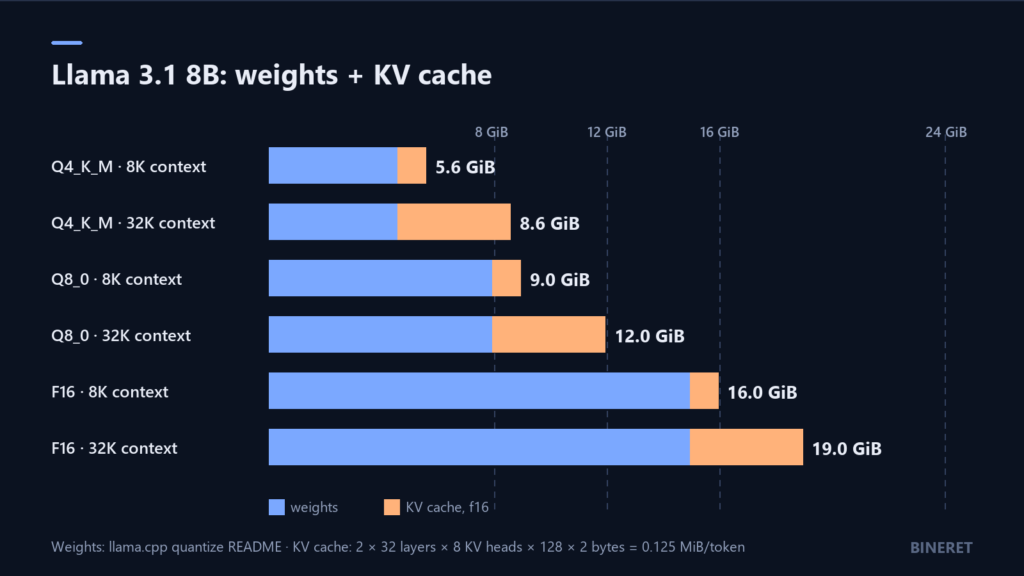
Add weights and cache for the combinations you might actually run:
| Llama 3.1 8B | 8K context | 32K context |
|---|---|---|
| Q4_K_M (4.58 GiB) | 5.6 GiB | 8.6 GiB |
| Q8_0 (7.95 GiB) | 9.0 GiB | 12.0 GiB |
| F16 (14.96 GiB) | 16.0 GiB | 19.0 GiB |
These are weights plus KV cache only. Leave room above them for the compute buffer, the runtime, and on a desktop, whatever your display and other applications already use. Read practically:
- An 8 GB card runs an 8B model at Q4_K_M comfortably at 8K context. At 32K, 8.6 GiB is already over the card before overhead.
- A 12 GB card handles Q4_K_M at 32K with room, or Q8_0 at shorter contexts.
- A 16 GB card fits Q8_0 at 32K, but F16 at any useful context is too tight.
- A 24 GB card runs F16 at 32K. Most people use that headroom for a larger model at Q4 instead.
Settings that change the answer
If you run models through Ollama, three settings move these numbers directly. All three are documented in its FAQ.
Context length. Ollama uses a 4,096-token context by default, which keeps the cache small, about 0.5 GiB for the 8B model above. It is also short for document work. Raise it with OLLAMA_CONTEXT_LENGTH for the server, or num_ctx per request, and now you know what each step up costs. If you are building document chat, this default is a common source of silently truncated context, which we cover in offline RAG with Ollama and AnythingLLM.
KV cache quantization. OLLAMA_KV_CACHE_TYPE sets the precision of the cache itself. The default is f16. Ollama describes q8_0 as using about half the memory with very small loss, and q4_0 as about a quarter, with notable precision loss at higher context lengths. For the 8B model at 32K, q8_0 takes the cache from 4 GiB to roughly 2 GiB. It is a global setting, so it applies to every model the server loads.
Flash attention. Ollama uses it automatically when the backend and device support it. You can force it on with OLLAMA_FLASH_ATTENTION=1 or off with 0.
How to tell when you got it wrong
When a model does not fit, it rarely fails outright. Ollama and similar runtimes offload some layers to the CPU and keep going, much more slowly. Check with:
ollama psThe processor column shows 100% GPU, 100% CPU, or a split such as 48%/52%. Any split means part of the model is running from system RAM. If generation suddenly slows after you raised the context window, this is almost always why. Lower the context, quantize the cache, or pick a smaller quantization until the column reads 100% GPU again.
A quick sizing routine
- Find the quantized file size, or estimate it: parameters × bits per weight ÷ 8.
- Open the model’s
config.jsonand read the layer count, KV heads and head dimension. - Compute KV bytes per token, and multiply by the context you actually need, not the model’s maximum.
- Add the two, then leave headroom for the compute buffer and everything else on the card.
- Run it and confirm with
ollama ps.
Once a model fits, the next question is what to run on top of it. Self-hosted ChatGPT alternatives compares the interfaces, and AnythingLLM is the quickest way to put a local model to work on your own documents. And if you are deciding whether local hardware beats paying per token at all, our LLM cost guide covers the other side of that sum.


Comments
No comments yet — be the first to share what you think.