Offline RAG with Ollama and AnythingLLM: chat with your documents, no cloud
A document chat that runs entirely on your own computer: Ollama for the models, AnythingLLM for indexing and retrieval, and the settings that quietly break it.

Plenty of people want to ask questions of their own documents and would rather those documents never leave the building. Contracts, patient notes, source code, a thesis in progress. The good news is that a retrieval setup that runs entirely on one computer is now an afternoon’s work with free tools. The less good news is that two or three defaults will make it give worse answers than it should, and nothing on screen tells you why.
This guide builds offline RAG with Ollama and AnythingLLM, one tool per job. Ollama runs the models. AnythingLLM handles the documents: it splits them, indexes them, retrieves passages and shows citations. Both are free, and both can work without a network connection once the models are on disk.
If you are not sure retrieval is what you need in the first place, RAG vs fine-tuning covers that decision first.
What “offline” has to mean here
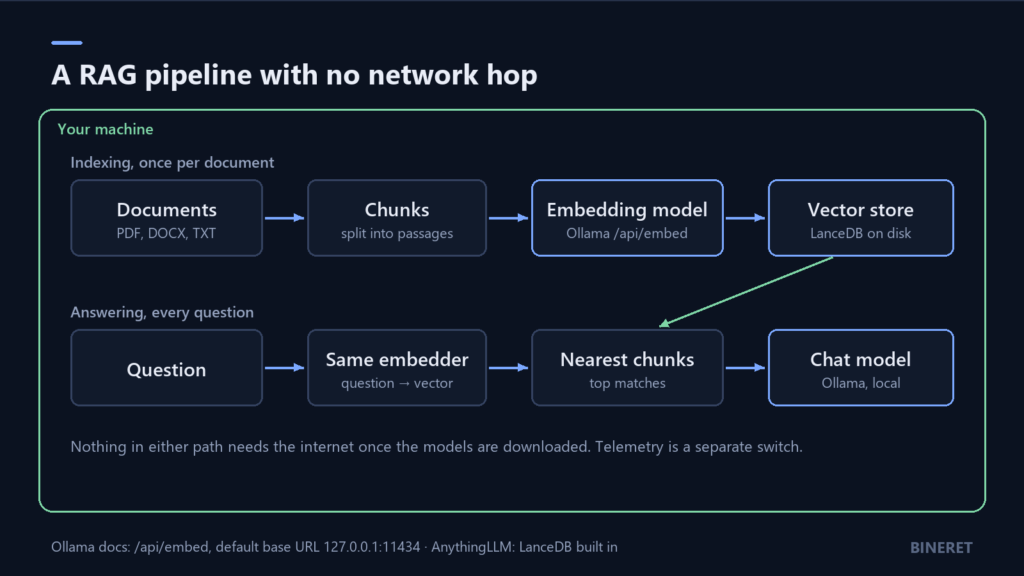
A RAG system makes two kinds of model call, and people often localise one and forget the other.
- Embedding. Every chunk of every document is turned into a vector when you index it, and every question is turned into a vector when you ask it.
- Generation. The chat model reads the question plus the retrieved chunks and writes the answer.
If either call goes to a hosted API, your text leaves the machine. An offline setup keeps both local, stores the vectors on local disk, and still works when you pull the network cable. That last test is the one worth actually doing.
Step 1: install Ollama and pull two models
Ollama is its own application, installed separately from AnythingLLM. Once it is running, it listens on http://127.0.0.1:11434. Pull a chat model and an embedding model:
ollama pull qwen3:8b
ollama pull embeddinggemma
The chat model is a matter of taste and hardware. An 8-billion-parameter model is a reasonable starting point on a machine with a mid-range GPU or a recent Mac. For scale, the llama.cpp project measures Llama 3.1 8B at 4.58 GiB in the common Q4_K_M quantisation, before any memory for the conversation itself. If you are unsure what fits, how much VRAM you need to run an LLM locally walks through the arithmetic.
The embedding model matters more than people expect. Ollama’s documentation lists embeddinggemma, qwen3-embedding and all-minilm as recommended options, and makes one rule explicit: use the same embedding model for indexing and for querying. Vectors from two different models live in different spaces, and comparing them returns confident nonsense.
Check where the chat model actually runs:
ollama psThe processor column shows 100% GPU, 100% CPU, or a split such as 48%/52%. A split means part of the model did not fit in GPU memory and is running on the CPU, which is the usual reason a local model feels much slower than a benchmark promised.
Step 2: point AnythingLLM at Ollama
Install the AnythingLLM desktop app. It ships with LanceDB as a built-in vector database, so there is nothing else to run. In its settings:
- Set the LLM provider to Ollama with the base URL
http://127.0.0.1:11434, and pick your chat model. - Set the embedder to Ollama as well, and pick the embedding model you pulled.
- Leave the vector database on LanceDB.
AnythingLLM can also run models through its own bundled engine, which is fine too. Using Ollama keeps the models available to other tools on the same machine, and makes ollama ps useful for checking what is loaded.
Step 3: fix the context window before you judge the answers
This is the setting that causes the most confusing results, so it gets its own step.
Ollama’s documentation states that it uses a context window of 4,096 tokens by default. For casual chat that is fine. For RAG it is tight. The prompt has to hold your system instructions, the retrieved chunks, the question, and room for the answer. Retrieve a handful of long passages and you can run past the window, at which point some of the text the model was supposed to read is not there when it answers.
The symptom looks like a retrieval failure: the citation panel shows the right passage, and the answer ignores it. Before tuning anything else, raise the window. Ollama gives three ways:
# for the whole server
OLLAMA_CONTEXT_LENGTH=16384 ollama serve

# inside an interactive session
/set parameter num_ctx 16384

# per request, in the API body
"options": { "num_ctx": 16384 }
A bigger window costs memory, because the model keeps a cache for every token of context. On a GPU that is already nearly full, raising it can push part of the model onto the CPU. Check ollama ps again after changing it. The trade-off is covered with real numbers in the VRAM guide linked above.
Step 4: index a small, known set first
Start with ten or twenty documents you know well, not the whole shared drive. Then write down ten questions whose answers you already know and where in the documents they are. This takes twenty minutes and it is the only way to tell whether a change later made things better or worse.
When an answer is wrong, look at the cited chunks before blaming the model:
- The right passage was not retrieved. That is a retrieval problem. Try a different embedding model, or check whether the document parsed cleanly. Scanned PDFs without a text layer are a common cause.
- The right passage was retrieved and the answer still missed it. Check the context window from step 3, then try a stronger chat model.
Keeping those two failure types apart is most of what RAG evaluation is. How to evaluate a RAG system turns the same idea into metrics you can track.
Step 5: turn off telemetry, then test with the network off
Local inference and zero network traffic are not the same thing. AnythingLLM sends anonymous usage events to PostHog by default. Its documentation lists what those events contain, such as the install type, that a document was added, and which model provider is in use, and says chat content is not included. If you want none of it, switch it off under Privacy in the sidebar. On a server, set DISABLE_TELEMETRY=true.
Even with telemetry off, the app talks to the providers you configure, to its own model CDN when you download models through it, and to GitHub for some cached files. With everything pointed at Ollama and the models already downloaded, none of that is needed to answer a question. Disconnect the machine and ask one of your ten test questions. If it answers with citations, the setup is genuinely offline.
Where this setup stops being enough
The desktop app is for one person on one computer. AnythingLLM keeps multi-user accounts with permissions, and the embeddable chat widget, for its Docker version. If a team needs shared access, run that instead, or look at a tool built for teams from the start, such as Onyx.
If your documents are mostly scans, dense tables or complex layouts, the parser becomes the weak point rather than the model. RAGFlow is heavier, with a documented minimum of 16 GB of RAM, but it is built for exactly that kind of material and lets you inspect and correct chunks before anything is answered from them.
For a single person with ordinary documents who wants privacy, though, AnythingLLM on top of Ollama is hard to beat for the effort involved.
Comments
No comments yet — be the first to share what you think.