LLM cost optimization: where the tokens go and how to stop paying for them twice
Most LLM bills are dominated by the same tokens sent over and over. Caching, batching, routing and shorter outputs, with the arithmetic for each.


An LLM bill looks mysterious until you print one request in full. Then it usually looks embarrassing. The system prompt is 3,000 tokens and identical on every call. The tool definitions are another few hundred, also identical. The retrieved passages include three that did not help. The answer is four paragraphs where one would do. Multiply by a month of traffic and most of the money turns out to be spent on sending the same text again.
That is good news, because repeated text is the cheapest thing to fix. This guide goes through the LLM cost optimization techniques that matter, in the order they usually pay off, with real prices and the arithmetic, so you can check whether each one matters for your traffic before you build anything.
Prices below are Anthropic’s and OpenAI’s published rates as of September 2026. They change, so treat the method as the durable part and recheck the numbers.
First, find out what you are paying for
Before any optimisation, log four numbers per request: input tokens, output tokens, cached tokens, and which feature or route made the call. Every major API returns the first three in its usage field. Without this breakdown you will optimise whatever is easiest to see rather than whatever is expensive.
Two facts about pricing shape everything that follows:
- Output costs more than input. On Claude Sonnet 5 it is $2 per million input tokens and $10 per million output tokens. Haiku 4.5 is $1 and $5. Opus 5 is $5 and $25. One output token costs as much as five input tokens on all three.
- Token counts depend on the tokenizer. Anthropic notes that Claude 4.7 and later models use a newer tokenizer that produces roughly 30% more tokens for the same text. A per-token price comparison across model generations is not a per-request comparison.
1. Prompt caching: stop paying full price for the same prefix
This is the largest saving available to most applications, and it is often a few lines of change.
When the start of a prompt is identical across requests, providers can reuse the work of processing it. Anthropic charges 1.25 times the base input price to write a prefix into its 5-minute cache, and 0.1 times the base price to read it back. The pricing page does the break-even for you: a 5-minute cache write pays for itself after a single read. The 1-hour cache costs 2 times the base price to write and pays off after two reads.
OpenAI enables caching by default on supported models. For GPT-5.6 and later, a prefix must be at least 1,024 tokens, cached input is billed at 0.1 times the normal rate, and a cached prefix stays eligible for 30 minutes after it was last used.
A worked example
Take a support assistant on Claude Sonnet 5. Every request carries a 6,000-token prefix of instructions and product documentation, plus a 400-token question, and gets a 300-token answer. It handles 100,000 requests a month.
Without caching:
- Input: 6,400 × 100,000 = 640 million tokens × $2 = $1,280
- Output: 300 × 100,000 = 30 million tokens × $10 = $300
- Total: $1,580
With the 6,000-token prefix cached. Traffic is steady, so the cache stays warm, and we assume a conservative 1% of requests have to write it:
- Cache writes: 1,000 × 6,000 = 6 million tokens × $2.50 = $15
- Cache reads: 99,000 × 6,000 = 594 million tokens × $0.20 = $118.80
- Uncached question tokens: 400 × 100,000 = 40 million × $2 = $80
- Output, unchanged: $300
- Total: $513.80, about 67% less
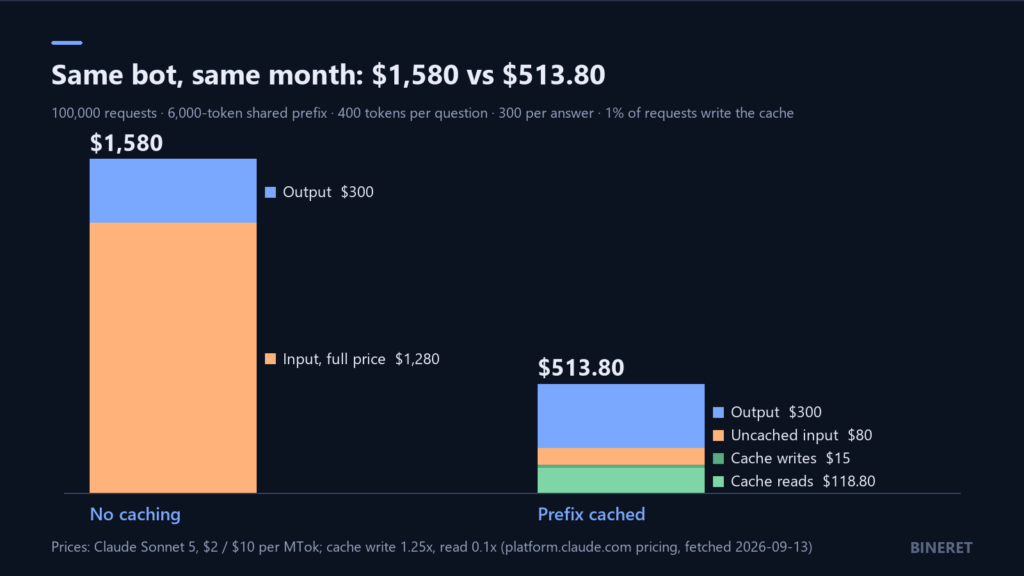
Notice what is left: output is now the largest line. That is typical once caching is in place, and it is why the later sections matter.
The details that make caching silently fail
- It is prefix-based. Anthropic’s documentation is explicit that caching is 100% prefix matching. Anything that changes near the start of the prompt, such as a timestamp, a user name or a request ID in the system prompt, means no request ever matches. Put stable content first and variable content last.
- There is a minimum length. On Anthropic it is 1,024 tokens for Sonnet 5, 4,096 for Haiku 4.5 and 512 for Opus 5. Shorter prefixes are simply not cached, and the API returns no error. Check the cache fields in the usage response rather than assuming.
- Order matters beyond text. Anthropic invalidates the cache in the order tools, then system, then messages. Changing a tool definition invalidates everything after it, including a long system prompt that did not change.
2. Batch anything that does not need an answer now
Both providers discount work you are willing to wait for. Anthropic’s Batch API takes 50% off input and output. OpenAI’s also takes 50%, with a completion window of 24 hours and up to 50,000 requests in one batch.
Good candidates are anything a person is not waiting on: nightly classification, bulk summarisation, re-embedding a document store, generating evaluation runs, enriching records.
Say you classify 200,000 documents a night on Claude Haiku 4.5, at 1,500 input tokens and 50 output tokens each. At standard rates that is 300 million input tokens ($300) plus 10 million output tokens ($50), so $350 a night. Through the Batch API it is $175. Anthropic’s pricing page notes that batch and caching discounts stack, so a shared instruction prefix in those requests can be cached on top.
3. Route easy requests to a smaller model
Many applications send every request to the most capable model because one kind of request needs it. A classifier in front, or simple rules, can send the rest somewhere cheaper. Anthropic’s own guidance on its pricing page is short: Haiku for simple tasks, Sonnet for most production work, Opus for the hardest reasoning.
The price gap is wide enough that routing even a minority of traffic moves the bill. Opus 5 input is five times the price of Haiku 4.5 input. The catch is quality, and it is a real one. Route with a test set in hand, and compare answers on the traffic you plan to move before you move it. Our RAG evaluation guide describes how to build one that stays useful.
4. Pay for fewer output tokens
Output is the most expensive token type, and models tend to write more than a product needs. Three changes usually help without hurting quality:
- Say how long the answer should be, in the prompt, in concrete terms: “two sentences,” not “be concise.”
- Set a maximum output length, so a runaway response has a ceiling.
- For structured tasks, ask for structured output. A JSON object with three fields is far shorter than a paragraph explaining the same three facts.
In the worked example above, cutting the average answer from 300 to 200 tokens saves $100 a month on its own, which is almost as much as the entire cost of the cache reads.
5. Send less context
Every token of context is billed on every request that carries it. Common sources of waste:
- Retrieving too many passages. Going from ten retrieved chunks to five halves that part of the prompt. Measure retrieval quality before and after, because the right number depends on your documents.
- Unbounded conversation history. Long chats resend every earlier turn. Summarise or trim old turns past a threshold.
- Tools that are not needed. Tool definitions count as input. Anthropic also adds a tool-use system prompt whenever tools are present: 354 tokens on Sonnet 5 with automatic tool choice, before your own definitions. Give each route only the tools it uses.
- Raw web pages. Anthropic estimates an average 10 kB web page at about 2,500 tokens. Extract the relevant text instead of passing whole pages.
6. Know what agents cost before you build one
Agents loop: think, call a tool, read the result, repeat. Each turn resends the growing context. Anthropic’s engineering team reported in June 2025 that agents typically use about 4 times the tokens of a chat interaction, and multi-agent systems about 15 times. For tasks that need that autonomy, the cost can be worth it. For tasks that a fixed sequence of steps would handle, it is pure overhead. AI agents vs workflows covers how to tell which you have.
7. Consider running it yourself, with open eyes
Self-hosting an open model turns a per-token bill into a hardware and operations bill. It can make sense at steady high volume, for private data, or when a smaller model is good enough. It rarely makes sense at low or spiky volume, where a GPU sits idle most of the day. If you are weighing it, start with what the hardware has to hold: how much VRAM you need to run an LLM locally.
The order to do this in
- Log tokens per request and per feature.
- Move stable content to the front of the prompt and turn on caching. Confirm cache hits in the usage data.
- Move everything non-interactive to a batch API.
- Set output length limits and tighten answer length in the prompt.
- Trim retrieved context, history and tools.
- Route by difficulty, with a test set to prove quality held.
The first three are mostly configuration. The last three need measurement. If you want someone to run that audit on a production system, it is part of what our AI and automation engineering service does.

Comments
No comments yet — be the first to share what you think.